
About a month before this post, I wrote on LinkedIn that the weekend lab project was ready: an NVIDIA RTX PRO 4000 Blackwell SFF 24 GB 70 W had arrived, and the plan was to add it to my homelab Kubernetes as a dedicated low-power GPU worker VM for local AI experiments and automation.
The plan sounded clean enough: Proxmox passthrough, one VM, one k3s worker, one GPU runtime path, and enough validation to understand what actually works.
This is the Day 2 version of that idea.
Day 1 - PCIe topology, firmware settings, VM shape, VFIO, driver behavior, and proving that the guest can see the card - happened as a weekend of
bring-up notes, not as a post on this blog. Day 2 is the more interesting operating problem anyway: what changes once the GPU becomes a Kubernetes
scheduling object instead of a device I can admire in lspci.
For scale: the lab cluster is five k3s nodes - four small control-plane/etcd nodes and this one dedicated GPU worker VM. Qdrant sits next to the model server because the next phase of this lab is RAG over my own notes.
This post is not a Proxmox passthrough tutorial. For that class of work I already have separate notes:
- Proxmox RX 7900 XTX Passthrough: Fix VFIO_MAP_DMA failed
- Proxmox Kiosk Desktop Appliance: Windows VM, GPU Passthrough, and Fast Recovery
Those posts are not about this exact NVIDIA card, but they cover the same kind of Proxmox/VFIO work: IOMMU groups, hostpci, VM shape,
firmware details, guest behavior, and the difference between “the VM booted” and “I would trust this as an operated system”.
The Day 2 Shape#
The final shape is intentionally boring, and it stacks in three layers: make the card schedulable, serve models through one gateway, and wrap operations around the whole thing.
From card to schedulable pod#
- Virtualization: Proxmox PCI passthrough gives one dedicated VM direct control of the physical GPU.
- Runtime path: Kubernetes RuntimeClass selects the NVIDIA-capable runtime handler.
- GPU resource: Kubernetes device plugins and the
NVIDIA k8s device plugin make the card visible to kubelet as
nvidia.com/gpu: 1. - Placement: Node Feature Discovery and NVIDIA GPU Feature Discovery publish hardware labels.
flowchart LR
  Card["RTX PRO 4000
24 GB / 70 W"] --> PT["Proxmox
passthrough"] --> VM["dedicated k3s
GPU worker VM"] --> Res["device plugin:
nvidia.com/gpu: 1"] --> Pod["one active
GPU LLM pod"]
  Models["node-local
/models disk"] --> VM
  RC["RuntimeClass: nvidia"] --> Pod
  NFD["NFD + GFD
node labels"] --> Pod
The serving path#
- Model runtime: llama.cpp server loads the local GGUF model, uses CUDA, exposes HTTP, and behaves predictably on this 24 GB card.
- Experiment and rollback lanes: vLLM profiles stay in Git; one of them is a validated rollback backend, the rest are experiments.
- API gateway: LiteLLM proxy gives clients stable aliases like
fast,chat, andagent.
flowchart LR
  Clients["clients
and agents"] --> LiteLLM["LiteLLM gateway
fast, chat, agent"]
  LiteLLM -->|"active lane"| Llama["llama.cpp
on the GPU pod"]
  LiteLLM -.->|"rollback and
experiments"| VLLM["vLLM profiles
in Git"]
  LiteLLM --> CPUSvc["embed / rerank / STT
CPU pods on other nodes"]
The operations wrap#
- Desired state: Argo CD keeps Kubernetes state in Git and makes drift visible.
- Telemetry: DCGM exporter exports GPU memory, utilization, power, temperature, PCIe, throttling, and Xid signals for Prometheus and Grafana.
flowchart LR
  Argo["Argo CD
GitOps"] --> Pod["GPU LLM pod"]
  Switch["preflight +
switch helper"] --> Pod
  Card["the card itself"] --> DCGM["DCGM exporter"] --> Grafana["Prometheus
Grafana"]
Could I run one model directly with Docker on the VM? Yes. That would be faster for one shell and one model.
I chose the Kubernetes path because the GPU is not a toy process in isolation. It has clients, aliases, storage, alerts, rollbacks, Git history, dashboards, and automation around it. I want the same operating model as the rest of the lab: declare the resource request, label the node, pin the runtime, check the rollout, observe the card, and keep the escape hatch obvious when I break something.
VM And Storage Shape#
The GPU worker is an extra Proxmox VM, not a bare-metal rebuild of the cluster. The control plane and the rest of the lab do not depend on that card. If the VM, passthrough, driver, or device-plugin layer misbehaves, I can drain or rebuild the GPU worker without pretending the entire cluster is broken.
The sizing lesson was to keep the expensive parts separable: OS disk, model disk, vector disk, GPU passthrough, and Kubernetes scheduling contract.
Kubernetes can tell me what the scheduler sees, but it cannot replace checking the guest when the question is sizing:
| Guest signal | Live value |
|---|---|
| Kernel | 6.12.94+deb13-amd64 |
| CPU model | 11th Gen Intel Core i7-11700T |
| vCPU count | 16 |
That CPU number matters. The first shape around this node was 8 vCPU. It was enough to boot the model and prove passthrough, but once the Kubernetes CPU requests for the model server, Qdrant, and system daemons were actually written down, there was almost no headroom left, so the VM grew to 16 vCPU. I treat sizing as something the platform can revisit, not as a trophy from first boot - and the workload side of that resize has its own drift story later in this post.
The storage layout is part of the design, not an implementation detail:
| Device | Guest size | Filesystem | Mount | Live usage |
|---|---|---|---|---|
system | 100G disk | ext4 | / | 100G total, 48G used, 45G free |
models | 200G disk | ext4 | /models | 197G fs, 106G used, 82G free |
qdrant | 100G disk | ext4 | /qdrant | 100G total, 2G used, 98G free |
The model cache is not “some storage”. It is a separate local disk. Qdrant follows the same pattern on its own disk, so vector storage work does not share the model-cache mount.
Model Disk, Not Model Magic#
I do not want a 20 GB model download to be part of normal pod startup. I also do not want a random PVC to hide where the model cache lives.
The boundary is deliberately plain:
guest disk mount:        /models
chart hostPath:          /models/vllm
container mount:         /models
GGUF files in container: /models/gguf
GGUF files on the guest: /models/vllm/gguf
Yes, the hostPath says vllm while the active engine is llama.cpp. That is legacy naming from when vLLM was the first lane on this card, and the
namespace carries the same history. Renaming a hostPath contract for cosmetics is exactly the kind of churn the contract exists to prevent, so the
name stays until a real migration gives a reason.
A hostPath is also a conscious single-node trade-off. It pins the model cache to this worker, which is fine when there is exactly one GPU node and the deployment is already pinned to it anyway. On a multi-node setup I would reach for a local PersistentVolume with node affinity, or an actual storage design, instead of pretending a hostPath travels.
The llama.cpp chart does not rely on runtime -hf downloads. A prefetch job downloads and verifies exact GGUF files from a lock file. The server then
starts from a local path.
Sanitized from the values:
modelCache:
  hostPath:
    path: /models/vllm
    type: Directory
  mountPath: /models
  ggufDir: /models/gguf

prefetch:
  enabled: true
  modelFileRefs:
    - qwen36-35b-a3b-ud-q4-k-m
    - qwen36-27b-q4-k-m
The lock file is the part that makes “the model” an auditable artifact instead of a filename. Shortened, for the active model:
qwen36-35b-a3b-ud-q4-k-m:
  repo: unsloth/Qwen3.6-35B-A3B-GGUF
  revision: a483e9e6cbd595906af30beda3187c2663a1118c
  file: Qwen3.6-35B-A3B-UD-Q4_K_M.gguf
  sha256: ac0e2c1189e055faa36eff361580e79c5bd6f8e76bffb4ce547f167d53e31a61
  sizeBytes: 22134528992
The prefetch job downloads from Hugging Face pinned to that revision and streams a full sha256 over the file before the server is allowed to start; a mismatch fails the job. The same sha256 and size land on the Deployment as annotations, so a running pod can always be compared against the lock.
The lock is also the restore story: model files are cattle. If the model disk dies, the prefetch job re-materializes the exact same artifacts from the lock file. Qdrant’s disk is the only one of the three that will ever hold state worth backing up, and its backup story is deliberately deferred until RAG actually puts data there.
The live pod sees the model disk like this:
$ df -h /models /models/gguf
Filesystem  Size  Used  Avail  Use%  Mounted on
/dev/sdb    197G  106G    82G   57%  /models
/dev/sdb    197G  106G    82G   57%  /models

$ ls -lh /models/gguf
16G  Qwen3.6-27B-Q4_K_M.gguf
21G  Qwen3.6-35B-A3B-UD-Q4_K_M.gguf
This is why disk growth stays below Kubernetes. Proxmox owns the virtual disk. The guest owns partition/filesystem growth and the stable mount. Helm only sees a host path that already exists.
The publishable guest-side pattern is:
# cloud-init / guest-side shape, sanitized
growpart:
  mode: auto
  devices: ["/"]

resize_rootfs: true

mounts:
  - [
      "/dev/disk/by-label/models",
      "/models",
      "ext4",
      "defaults,noatime,nofail,x-systemd.growfs",
      "0",
      "2",
    ]
  - [
      "/dev/disk/by-label/qdrant",
      "/qdrant",
      "ext4",
      "defaults,noatime,nofail,x-systemd.growfs",
      "0",
      "2",
    ]

runcmd:
  - mkdir -p /models/vllm/gguf /qdrant
The same options land in /etc/fstab in the guest (by UUID rather than label), so the mounts survive reboots without depending on cloud-init.
One uncomfortable but useful detail: cloud-init status currently reports an update_etc_hosts permission error on this VM. I am not hiding that, but
I am also not treating it as proof that model storage is broken. The mounts are active systemd mount units with the options above, and the
LLM pod is reading GGUF files from /models. This is why I like checking each layer separately instead of trusting one green status.
The GPU Contract#
The first decision was to stop pretending that a single GPU can behave like a pool.
The rule is:
- exactly one GPU LLM lane is active at a time;
- inactive lanes stay parked at zero replicas;
- applications talk to LiteLLM, not directly to vLLM or llama.cpp;
- model switches run through a helper script with a preflight check;
- Argo CD owns the manifests, with selected replica drift allowed only for controlled GPU switches;
- GPU-critical runtime images are pinned by digest where the GitOps chart owns the release;
- model artifacts are locked by GGUF checksum and Hugging Face revision where reproducibility matters;
- GPU health is visible through Kubernetes scheduling state and DCGM.
That sounds strict for a homelab, but it removed ambiguity. The cluster does not have to guess which model owns the GPU, and clients do not have to know
which backend is active today. LiteLLM exposes stable aliases like fast, chat, agent, embed, rerank, and stt; the backend can move behind
that. The embedding, rerank, and STT aliases are real routes, but they are served by CPU backends on other nodes - more on that in the lanes section.
RuntimeClass Is Not The GPU#
A GPU workload should say two different things clearly:
RuntimeClass/nvidiaselects the container runtime handler namednvidia.nvidia.com/gpu: 1asks Kubernetes for one GPU exposed by the NVIDIA device plugin.
Those are related, but they are not the same knob. RuntimeClass does not install the driver, does not create the GPU resource, and does not make the model fit in VRAM. The device plugin is the part that makes the GPU visible as an allocatable resource.
Sanitized from the llama.cpp values:
runtimeClassName: nvidia

resources:
  requests:
    cpu: "8"
    memory: 32Gi
    nvidia.com/gpu: 1
  limits:
    cpu: "14"
    memory: 64Gi
    nvidia.com/gpu: 1

nodeSelector:
  workload.ai/gpu: "true"

tolerations:
  - key: workload.ai/dedicated
    operator: Equal
    value: gpu
    effect: NoSchedule
Small Kubernetes detail that is easy to forget: GPUs are extended resources. For GPU resources, Kubernetes allows specifying only limits, or specifying
both requests and limits with the same value. That is why nvidia.com/gpu is 1 in both places here. CPU and memory can use different request and
limit values; the GPU count is not a burstable CPU-style budget.
The CPU values are deliberate. The VM is a 16 vCPU worker, and Kubernetes exposes 15 allocatable CPUs. requests.cpu=8 gives llama.cpp a real CPU budget
while leaving headroom for Qdrant and system daemons. limits.cpu=14 lets it burst close to the node size without pretending the rest of the node does
not exist.
The live deployment matches the contract:
replicas: 1
runtimeClassName: nvidia
nodeSelector:
  workload.ai/gpu: "true"
  kubernetes.io/hostname: "<gpu-worker>"
tolerations:
  workload.ai/dedicated=gpu:NoSchedule
resources:
  requests: cpu=8, memory=32Gi, nvidia.com/gpu=1
  limits:   cpu=14, memory=64Gi, nvidia.com/gpu=1
volumes:
  /models   <- hostPath /models/vllm
  /dev/shm  <- memory emptyDir, 8Gi
The /dev/shm volume is a memory-backed emptyDir, so those 8Gi count against the container’s memory accounting, not against any disk - worth remembering
when reading the memory numbers below.
The worker runtime path also matches the manifest instead of only looking right on paper:
containerRuntimeVersion: containerd://2.2.3-k3s1
RuntimeClass/nvidia:
  handler: nvidia
allocatable:
  nvidia.com/gpu: 1
The model command is intentionally visible in the pod spec:
-m /models/gguf/Qwen3.6-35B-A3B-UD-Q4_K_M.gguf
--alias qwen36-35b-gguf-fast
--ctx-size 49152
--cache-type-k q8_0
--cache-type-v q8_0
--n-gpu-layers 999
--flash-attn on
--parallel 1
--jinja
--host 0.0.0.0
--port 8080
--metrics
The generated Deployment carries two details I do not want to forget:
metadata:
  labels:
    platform.example.com/gpu-llm: "true"
  annotations:
    ai.example.com/model-file-sha256: "<locked GGUF sha256>"
    ai.example.com/model-file-size-bytes: "<locked file size>"
spec:
  strategy:
    type: Recreate
  revisionHistoryLimit: 2
  template:
    spec:
      automountServiceAccountToken: false
      enableServiceLinks: false
Cross-checking those annotations against the lock file surfaced a wart: Helm renders the size annotation in scientific notation (2.2134528992e+10)
because the lock value flows through a YAML float. Harmless today, but a lock value that exists for exact comparison should survive as a quoted string.
That fix goes to the chart.
Recreate is intentional. I only have one GPU and one serving replica, so pretending this can roll like a normal stateless Deployment would be misleading.
The model pod has to release the GPU before the next one can take it.
NVIDIA Device Plugin As A Production Dependency#
The NVIDIA device plugin is not just “the thing that makes GPUs appear”. It registers with kubelet and serves the device allocation path: when a pod
asks for nvidia.com/gpu, kubelet can only admit it onto the node if the plugin currently reports a healthy device to allocate. In a single-card
cluster, that puts the plugin directly in the startup path of the most important workload.
This section is intentionally NVIDIA-specific. The part that generalizes is the pattern: vendor device plugin, explicit resource request, runtime wiring, node labels, and telemetry. The exact resource names, labels, sharing modes, and operational traps are vendor details.
The production overlay pins the device plugin image by tag and digest, uses runtimeClassName: nvidia, enables GPU Feature Discovery and Node Feature
Discovery, and schedules only onto GPU-labelled nodes.
Sanitized from the overlay:
runtimeClassName: nvidia

image:
  tag: "v0.19.2@sha256:<pinned-digest>"

devicePlugin:
  enabled: true
gfd:
  enabled: true
nfd:
  enabled: true

migStrategy: none
failOnInitError: true
deviceListStrategy: envvar
deviceIDStrategy: uuid

nodeSelector:
  workload.ai/gpu: "true"

tolerations:
  - key: CriticalAddonsOnly
    operator: Exists
  - key: nvidia.com/gpu
    operator: Exists
    effect: NoSchedule
  - key: workload.ai/dedicated
    operator: Equal
    value: gpu
    effect: NoSchedule
The device plugin settings are conservative:
- no MIG;
- no MPS in production for the active chat lane;
- environment variable device list strategy;
- UUID-based device identity;
- fail on init error.
The last one matters. If the device plugin cannot initialize the GPU, I want the system to fail loudly. Quiet partial success is worse than a hard failure when the only GPU is the resource under test.
Here is the live node evidence, sanitized to remove the node name:
role: ai-worker
status: Ready
version: v1.35.5+k3s1

taints:
  - workload.ai/dedicated=gpu:NoSchedule

capacity:
  cpu: "16"
  memory: "61653804Ki"
  nvidia.com/gpu: "1"
  pods: "110"

allocatable:
  cpu: "15"
  memory: "57457452Ki"
  nvidia.com/gpu: "1"
  pods: "110"

conditions:
  Ready: "True"
  MemoryPressure: "False"
  DiskPressure: "False"
  PIDPressure: "False"
The node carries two families of GPU labels, and they have different owners. The first family is mine: semantic labels applied at node registration as
k3s --node-label arguments, describing what the node is for rather than what silicon it has:
workload.ai/enabled: "true"
workload.ai/gpu: "true"
workload.ai/gpu-family: blackwell
workload.ai/gpu-model: rtx-pro-4000-blackwell-sff
workload.ai/gpu-tier: support
workload.ai/gpu-vendor: nvidia
workload.ai/profile: inference
workload.ai/vram: 24gb
These are deliberately not GFD output. Future hardware should not require rewriting every workload: a bigger card can become gpu-tier=big or
profile=brain, and the current 24 GB card can stay as a support accelerator. One label in that list is a small lie of ownership, though:
gpu-tier=support is currently applied out-of-band instead of living in the bootstrap arguments with its siblings. Same label, different owner -
exactly the kind of drift this setup is supposed to make visible.
The second family is published by GPU Feature Discovery through NFD, from hardware facts:
nvidia.com/gpu.product: NVIDIA-RTX-PRO-4000-Blackwell-SFF-Edition
nvidia.com/gpu.family: blackwell
nvidia.com/gpu.count: "1"
nvidia.com/gpu.memory: "24467"
nvidia.com/gpu.compute.major: "12"
nvidia.com/gpu.compute.minor: "0"
nvidia.com/gpu.sharing-strategy: none
nvidia.com/gpu.replicas: "1"
nvidia.com/mig.capable: "false"
nvidia.com/mps.capable: "false"
nvidia.com/vgpu.present: "false"
nvidia.com/cuda.driver-version.full: "610.43.02"
nvidia.com/cuda.runtime-version.full: "13.3"
Since versions matter for a stack like this, here is the full component snapshot in one place. This is a live snapshot, not a version recommendation - newer releases may exist by the time you read this. I pin GPU-node components deliberately and upgrade the device plugin separately from the model runtime:
| Layer | Live version |
|---|---|
| k3s / kubelet | v1.35.5+k3s1 |
| containerd | 2.2.3-k3s1 |
| NVIDIA driver / CUDA | 610.43.02 / 13.3 |
| NVIDIA container toolkit | 1.19.1 |
| NVIDIA device plugin | v0.19.2, digest-pinned |
| GPU Feature Discovery | bundled with the device plugin chart |
| Node Feature Discovery | v0.17.3, digest-pinned |
| DCGM / exporter | 4.5.3 / 4.8.2 |
| llama.cpp server image | build b9641 CUDA image, digest-pinned |
Pinned does not mean forgotten: the driver and container toolkit packages flow through a locally cached, policy-controlled APT mirror, and the toolkit sits on the same watchlist as the rest of the pinned stack, because that layer gets security updates like any other supply-chain component.
The guest-level nvidia-smi snapshot says the same thing in a lower-level way:
name: NVIDIA RTX PRO 4000 Blackwell SFF Edition
driver: 610.43.02
memory.total: 24467 MiB
memory.used: 21642 MiB
memory.free: 2386 MiB
power.limit: 70 W
power.draw: about 9 W while idle
temperature: 37 C
current PCIe link: gen1 x8 while idle
The PCI view from inside the VM is also useful:
<passed-through-vga> VGA compatible controller:
  NVIDIA Corporation GB203GL [RTX PRO 4000 Blackwell SFF Edition]
  Kernel driver in use: nvidia
  Kernel modules: nouveau, nvidia_drm, nvidia

<passed-through-audio> Audio device:
  NVIDIA Corporation GB203 High Definition Audio Controller
  Kernel driver in use: snd_hda_intel
The gen1 x8 value is the current idle link state, not the whole passthrough story - the link retrains upward under load, and there are measured
numbers for that later in this post. What I care about in daily operations is that the driver, container runtime, GFD labels, device-plugin allocation,
and DCGM metrics all describe the same card.
Serving Lanes#
The names in this stack sound similar, but they describe different layers.
An LLM is the model itself: weights and tokenizer. In this post, the active model is a Qwen GGUF file on the local /models disk. GGUF is the model-file
format used by llama.cpp, and the Q4 file is small enough to fit this 24 GB card with the context settings I actually use.
llama.cpp is the server/runtime. It loads the GGUF file, puts as much work as possible on the NVIDIA GPU, exposes HTTP, and reports metrics. This is the active lane because it is boring in the useful way: model file in, server up, health check green, predictable VRAM use.
vLLM is another serving engine, and it ran this card first. The reasons llama.cpp became the default are concrete rather than ideological. vLLM
preallocates a VRAM pool (gpu-memory-utilization) and earns that cost back with batched, concurrent traffic; this card serves a single user at
--parallel 1. The GGUF Q4 quantization ecosystem is what lets a 35B-A3B MoE model run here at 49K context, where the vLLM lane on the same card was
serving a dense 8B model at 8K context. And llama.cpp reports decode/prefill timings I use directly in acceptance checks. vLLM remains excellent for
high-throughput serving patterns - it is just not the right default for one card and one user.
LiteLLM sits one layer higher. Clients ask for fast or agent; they do not hardcode qwen36-35b-gguf-fast or a Kubernetes service name. Backend churn
stays behind the gateway.
The lane table is the important part. Parked GPU deployments still declare nvidia.com/gpu: 1, but at replicas=0 they do not consume the card.
Every lane runs with runtimeClassName: nvidia; the engine column is the model server inside the pod:
| Lane | Engine | Replicas | GPU request/limit |
|---|---|---|---|
qwen36-35b-gguf-fast | llamacpp | 1 | 1 / 1 |
qwen36-35b-gguf-longctx | llamacpp | 0 | 1 / 1 |
qwen36-27b-deep | llamacpp | 0 | 1 / 1 |
qwen36-nvfp4-experiment | vllm | 0 | 1 / 1 |
gpt-oss-agent | vllm | 0 | 1 / 1 |
vllm (rollback) | vllm | 0 | 1 / 1 |
One detail worth stealing: the longctx lane buys its 64K context on the same 24 GB card by offloading some MoE expert layers to CPU
(--n-cpu-moe), trading decode speed for context length. Same card, different trade.
“Rollback” is a strong word, so that lane has to earn it. The vllm lane (an older-generation dense Qwen3-8B) is not a hopeful YAML file: it
was the production default on this card before the llama.cpp cutover, it has a recorded live validation from that period (GPU utilization at 98%, about
70 W and roughly 20 GiB VRAM under load), its model is prefetched and protected from cache cleanup, and the switch helper has exercised the path in both
directions. The caveat: it has not been re-validated since the cutover, because a single GPU cannot run both backends side by side. So it is a
validated fallback with aging evidence - which is still a different thing from the two experiment lanes below it, whose status the preflight reports
bluntly (one of them is known-broken).
By category, the routes clients actually see:
- chat/agent aliases → the active llama.cpp GPU lane;
rollback→ the parked vLLM lane above;embed,rerank,stt→ CPU-backed services on other nodes: a text-embeddings server and a reranker sharing one deployment, and a faster-whisper gateway. They are deliberately kept off the GPU node so they never compete with the LLM lane for CPU, and none of them touch the card.
At first, “GPU pod runs” looked like the finish line. It was not - everything else in this post came after that moment.
What I Tried And Did Not Keep#
I looked at the usual ways to share the card more aggressively:
- MIG: not supported on this card (
mig.capable: falsein the labels above), and slicing would not fit a workload whose active model wants most of the card anyway. - MPS: attractive on paper, but the active chat model already uses most of the 24 GB card.
- time-slicing: possible as a stopgap, but it gives scheduling fairness, not real memory isolation.
- embeddings or STT on the same card: too tight until a second GPU exists - so they run as the CPU services described above instead of queueing behind the chat model.
It is easy to draw a nice “AI platform” where chat, embeddings, reranking, STT, and tools all share one GPU. The failure mode is simple: the first large chat model eats the card, and the rest of the diagram becomes wishful thinking.
So I kept the 24 GB card as one active LLM lane and moved the rest of the system around that fact.
Operational Lessons#
Three lessons from operating this thing are worth more than the diagrams: drift shows up wherever you stop looking, maintenance windows exist even in a homelab, and never tear down the current state before validating the next one.
Drift Caught While Writing#
This post caught a real mistake.
While checking the article, I found that the VM and Kubernetes were already at 16 vCPU, but the llama.cpp GitOps values still carried the CPU budget
sized for the old, smaller VM: requests.cpu=6, limits.cpu=12. The live node had grown, but the workload contract still described the previous shape.
The fix was deliberately not “give the model everything”:
VM sizing:              16 vCPU, 58Gi RAM
Kubernetes allocatable: 15 CPU, about 54.8Gi RAM
llama.cpp request:       8 CPU, 32Gi RAM, 1 GPU  (was 6 CPU)
llama.cpp limit:        14 CPU, 64Gi RAM, 1 GPU  (was 12 CPU)
The node allocation after the fix is the sanity check:
| Resource | Requests | Limits |
|---|---|---|
| CPU | 10755m / 71% | 18100m / 120% |
| Memory | 43072Mi / 76% | 75Gi / 136% |
| GPU | 1 | 1 |
CPU and memory limits over 100% are not the same kind of overcommit, and they deserve different sentences. CPU limits over allocatable are genuinely fine: the failure mode is throttling, and the scheduler placed everything by requests anyway. Memory is harsher. The pod’s 64Gi limit is above the node’s ~54.8Gi allocatable, so as a cgroup guard it is unreachable - under real memory pressure, kubelet eviction or the kernel OOM killer acts long before that limit would. And because requests and limits differ, the pod is Burstable QoS, which makes the most important pod on this node an eviction candidate exactly when the node is struggling. I keep the shape anyway: the node is single-purpose, the 32Gi request is realistic, and eviction thresholds are the real guard. But that is a conscious risk on a dedicated node, not a general “limits over 100% are fine”.
What I am not fine with is requests silently consuming the entire node. That is the difference between overcommit and a scheduling trap.
The Maintenance Trap#
The strongest operational lesson came from a normal-looking update.
I had two changes ready:
- update the NVIDIA device plugin from one pinned release to the next;
- refresh the llama.cpp CUDA server image digest.
On paper these are separate layers. In practice, rolling both during the same window on one GPU is how I met this failure class live:
UnexpectedAdmissionError: Allocate failed due to no healthy devicesThe mechanics are worth spelling out. A model pod that is already running survives a device-plugin restart, because kubelet does not re-allocate devices
for admitted pods. But this Deployment uses Recreate, so a model update tears the pod down and admits a fresh one - and if that admission lands while
the device plugin is mid-re-registration, kubelet has no healthy nvidia.com/gpu to allocate and the pod fails.
The fix is plain scheduling of my own time:
- update the NVIDIA device plugin first;
- wait until the node reports GPU capacity and allocatable count correctly and the plugin pod is Ready;
- watch for stability for a few minutes;
- only then roll the model runtime image, in a separate window - half an hour later is fine, the next day is better.
That split is now part of the runbook. It looks like ceremony only until it saves you from a messy rollback.
Recovery from uglier failures follows the same layering. A node reboot re-registers the device plugin and recreates the pinned pod from the same local model files. A wiped model disk is re-materialized by the prefetch job. An Xid error pages immediately as critical - with one card there is no failover, so the response is a human, not an operator.
Preflight Before Scale-Down#
The model switch helper evaluates the target lane before it scales down the currently serving model. On a one-GPU system, the current model is also the rollback. If I tear it down before discovering that the target cannot fit or cannot start, I created my own outage.
The preflight checks:
- target model profile;
- GPU labels and node selectors;
- whether the target needs one or more GPUs;
- known broken profiles;
- live GPU state when a running GPU pod is available;
- likely quantization and memory fit;
- ambiguous or missing placement labels.
The exit codes are explicit:
0means pass;10means warn;20means block.
A warning can be forced for a deliberate experiment; a block cannot. A block stops the switch before the current model is touched. The script itself lives in the private lab repo, so there is no link - the check list and exit codes above are the contract it enforces, and the outputs below are what it looks like.
This is the happy path, sanitized:
GPU fit preflight: PASS fast
gpu: NVIDIA RTX PRO 4000 Blackwell SFF Edition, total=24467MiB
lane: qwen36-35b-gguf-fast, engine=llamacpp
fit: ctx=49152, quant=Q4_K_M, live_peak_mib=21648
checks:
  [PASS] gpu_inventory: cluster exposes one allocatable GPU
  [PASS] model_lock: GGUF file is locked with sha256 and sizeBytes
  [PASS] prefetch_config: modelFileRef is listed in prefetch config
  [PASS] kv_cache_type: K/V cache types modeled as q8_0/q8_0
  [PASS] validated_live_peak: fast lane has acceptance evidence on this GPU
decision: PASS
And this is the kind of block I want before any scale-down happens:
GPU fit preflight: BLOCK nvfp4
lane: qwen36-nvfp4-experiment, engine=vllm
checks:
  [BLOCK] known_broken: vLLM rejects this checkpoint with lm_head.input_scale
          model-class mismatch; this is not an OOM.
  [WARN] validation_status: no successful load/serve validation is recorded
  [BLOCK] cache_prefetch: model is not prefetched
decision: BLOCK; do not scale the GPU lane.
The switch script is written around that contract:
scripts/llm-fit-preflight.py fast --namespace vllm
kubectl -n vllm scale deployment/vllm \
  deployment/qwen36-35b-gguf-longctx \
  deployment/qwen36-27b-deep \
  --replicas=0
kubectl -n vllm scale deployment/qwen36-35b-gguf-fast --replicas=1
The real script discovers which known deployments exist, waits for rollout completion, and checks the invariant at the end: exactly one running GPU LLM pod and zero pending GPU LLM pods. The important part is ordering. The preflight runs before the current model is touched.
I also test that ordering:
python -m pytest \
  tests/test_switch_gpu_llm.py \
  tests/test_llm_fit_preflight.py \
  tests/test_nvidia_device_plugin.py \
  tests/test_llamacpp_gpu_digest.py \
  -q

26 passed
Two of those tests exist specifically to guard that ordering: one asserts that a preflight BLOCK prevents any scale-down at all, and one asserts that scaling only happens after the preflight and ends with the GPU invariant check.
Measured: Qwen3.6-35B-A3B On The RTX PRO 4000 SFF#
The production llama.cpp lane is not just assumed to be good. It has measured behavior.
These numbers are not a generic benchmark for the model or the GPU. They are acceptance evidence for this exact lane: this model file, the runtime
image pinned in Git at the time, this context setting, this gateway path, and this 24 GB card. Single user, --parallel 1. I also keep the model gateway
in the measurement path: direct backend performance is useful for debugging, but users and tools call LiteLLM, so gateway overhead is part of the
production experience.
The acceptance run for the fast lane defined expectation bands up front and then measured against them (TTFT is time to first token):
| Check | Result | Expectation band | Verdict |
|---|---|---|---|
| Decode around 2K context | about 83.9 tok/s (512 tokens out, 1781-token prompt) | 80-95 tok/s | PASS |
| Decode around 40K filled context | about 58.9 tok/s (61.8 on a 35K rerun) | 60-75 tok/s | WARN |
| Cold start around 30K context | about 1819 prompt tok/s (30102 tokens), TTFT 16.8 s | TTFT ≤ 40 s | PASS |
| Tool calling via the gateway | full round trip, finish_reason=tool_calls | - | PASS |
The WARN is not decoration: the 40K decode landed just under its 60-75 band, and I recorded it as expected single-GPU long-context degradation rather than rounding it up to a pass. Writing the bands down first is what makes a regression a number instead of a feeling.
Two other numbers float around this lane and deserve their provenance stated, because they are higher and it would be easy to quote them as “the”
performance: a later runtime-image refresh was smoke-tested with a short chat prompt and measured about 96.7 tok/s directly against llama.cpp and about
88.7 tok/s through the LiteLLM fast alias. Real numbers, different question: short-prompt decode against a nearly empty KV cache, on a newer llama.cpp
build, checking a rollout against the lane’s recorded smoke baseline - not measuring what a working context feels like.
The most methodical measurement of the gateway path is a separate baseline: 10 sequential samples per alias from inside the cluster, deterministic
prompt, temperature=0, max_tokens=128, model pod restart count checked before and after:
| Alias | p50 latency | Visible tok/s (p50) |
|---|---|---|
chat (thinking off) | 1.29 s | 86.3 |
fast (thinking on) | 1.59 s | 80.5 |
“Visible tok/s” counts the tokens the client actually receives over wall-clock time. The fast alias keeps the model’s default reasoning enabled - the
name refers to the lane, not the sampling - so part of its generation budget is spent thinking before visible output; chat runs with thinking disabled.
The context-length numbers matter most. A model that looks fast on a tiny prompt can feel very different when it has to read a handoff, a runbook, and a diagnostic log excerpt in the same request.
The Card Under Load#
The idle snapshot earlier (9 W, 37 C, PCIe gen1 x8) is only half the story. From DCGM history over recent load windows, plus a recorded validation run, the same card under sustained inference looks like this:
| Signal | Idle | Under load |
|---|---|---|
| Power draw | about 9 W | pinned at the 70 W enforced limit |
| Temperature | 37 C | high 40s to low 60s C (70s peak) |
| SM clock | 180 MHz | about 1.6-1.9 GHz |
| PCIe link | gen1 x8 | gen4 x8 |
| VRAM | about 21.1 GiB | about 21.1 GiB - the same |
Three observations from that table.
First, the PCIe link. The idle gen1 x8 retrains to gen4 x8 the moment the card works, and gen4 is the correct ceiling here: the card itself is
Gen5-capable, but both the virtualized PCIe topology and this host’s PCIe 4.0 platform cap the link at Gen4. The width question (x8 negotiated against a
reported x16 maximum) is still on my list to chase down at the physical-slot level.
Second, power. A 70 W card under sustained inference load sits pinned at its power cap at healthy temperatures - utilization 100%, low 60s C in the recorded validation. That is the normal working state for this card, not an incident, and the monitoring encodes that: the power-throttling alert is deliberately demoted to informational severity, while thermal throttling remains the actionable signal.
Third, VRAM. It does not move between idle and load. The KV cache and weights are allocated up front; “the card is quiet” and “the card is free” are different claims, which is the recurring theme of this post.
Why It Fits In 24 GB#
The VRAM budget is checkable arithmetic, roughly: the Q4 model file is about 20.6 GiB of weights, the q8_0/q8_0 KV cache at 49152 context adds most of the rest, and CUDA plus runtime buffers fill the gap to the measured peak of 21648 MiB on a 24467 MiB card - about 2.8 GiB of headroom. That headroom is why this lane runs at 49K context and not 64K.
The uncomfortable detail: an early naive weights-plus-KV formula overestimated the live footprint by more than a gibibyte. That is why the preflight trusts a recorded live peak from acceptance over arithmetic - the formula answers “could it fit”, the recorded peak answers “did it fit, here”.
Observability Around The GPU#
The GPU lane is monitored as an application, not as a screenshot from nvidia-smi.
DCGM exporter provides the GPU telemetry I actually want in dashboards:
- framebuffer memory used and free;
- GPU utilization and memory-copy utilization;
- temperature;
- power draw;
- clocks;
- PCIe counters;
- Xid errors (driver-level error events);
- throttling signals.
The exporter also attaches pod labels to the GPU series, so the metrics can say which pod owns the card - on a one-GPU node that mostly confirms the invariant, but it makes the dashboards portable to a multi-GPU future.
The AI stack also has application-level checks:
- LiteLLM model aliases are probed;
- chat, tool calling, embeddings, rerank, and STT routes have active checks - and they are real exercises, not pings: the tool-calling probe forces a tool choice and validates that a tool call comes back, and the STT probe uploads a generated WAV file;
- model pod restart count is treated as a sentinel;
- the “exactly one GPU LLM” invariant is recorded as metrics and enforced by alerts (more than one running GPU LLM pod is treated as an incident);
- the active model
/healthpath is checked independently from metrics scraping.
Parked lanes get the inverse treatment: the generic “HTTP probe failed” alerts explicitly exclude lanes whose zero-replica state is intentional, and the invariant alerts own that signal instead. Silence about a parked lane is correct; silence about the active lane is an incident.
This separation helped in practice. A model can be serving while a direct scrape target is misconfigured. A scrape target can be green while the user-facing alias is wrong. I want to know which layer failed.
This is the public-safe snapshot I would include rather than a raw Grafana screenshot with private labels:
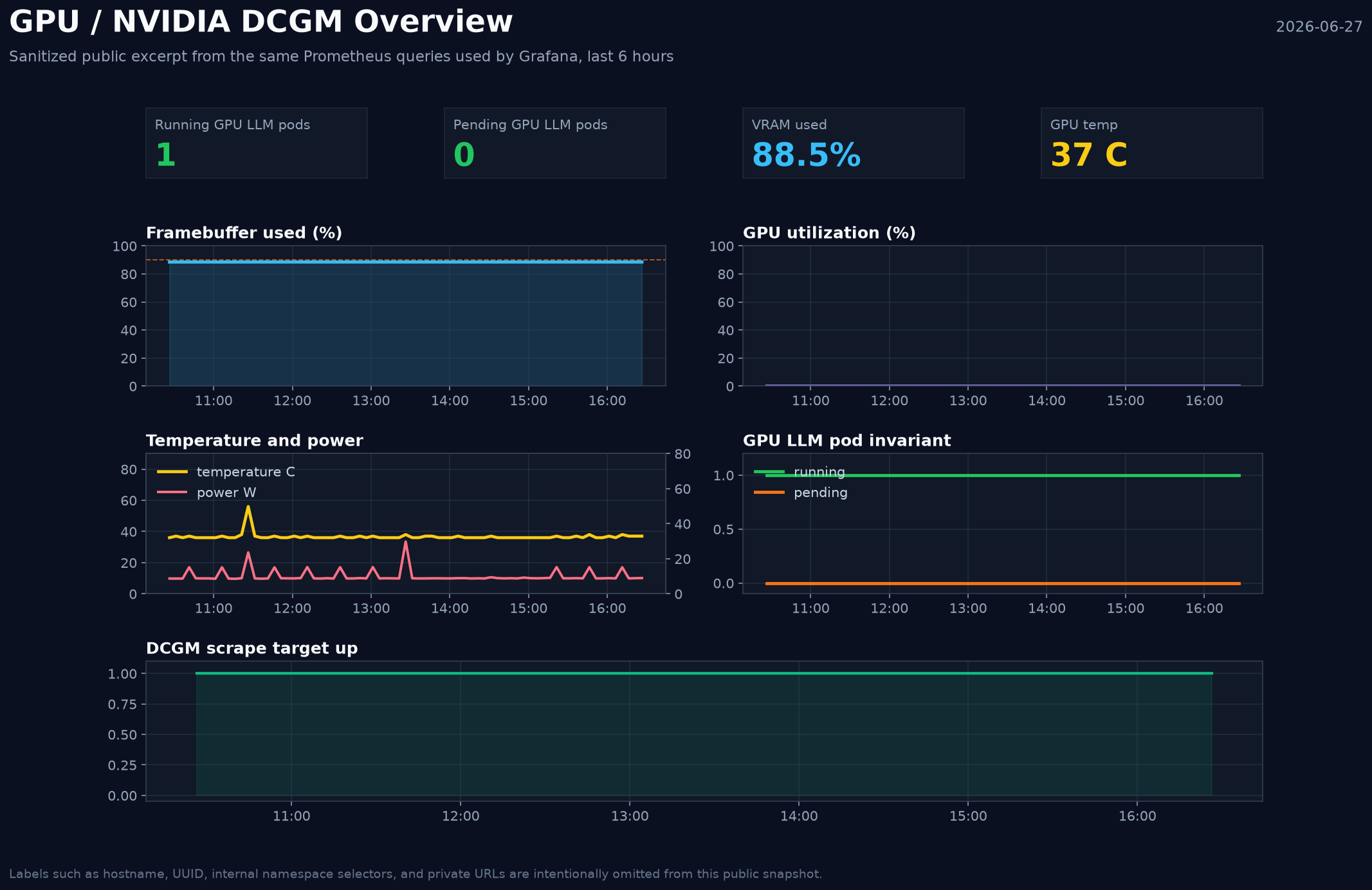
The real dashboards are GPU / NVIDIA DCGM Overview and AI / Inference Operational Overview. The Grafana Image Renderer plugin is not installed in my
instance, so this image is not a native Grafana PNG export. I exported the panel queries, queried Prometheus through the same datasource, and rendered this
sanitized excerpt without hostname, UUID, or internal URL labels.
The picture is still useful evidence. It shows the invariant I care about: one running GPU LLM pod, zero pending GPU LLM pods, DCGM scraping up, and VRAM already mostly occupied even when GPU utilization is idle.
One live example: at 19:33, kubectl top showed the node using almost no CPU - the model pod sat at a few millicores, its container memory far below its
request - while nvidia-smi still showed about 21.1 GiB of VRAM used. That is why I do not use CPU/RAM metrics as a proxy for GPU ownership. The quiet
card was still the owned card.
When Not To Do This#
The contract earns its keep here because the GPU has clients, GitOps, and monitoring around it. It is not a universal recommendation:
- one user, one model, no Kubernetes elsewhere in the lab - Docker Compose on the VM is the honest answer, and this whole post is overhead;
- no GitOps for the rest of your infrastructure - the drift-visibility half of the design brings little if nothing else works that way;
- models that need more than the card - no scheduling contract makes a 24 GB card serve a 48 GB model; that is a hardware problem;
- real multi-tenant GPU sharing - that wants MIG-capable hardware and a different design, not taints and a switch script.
What I Would Fix Next#
The system is usable, but a few things are still worth tightening:
- chase the PCIe link width question (x8 negotiated vs x16 reported max) down to the physical slot wiring;
- try the Qwen3.6 MTP GGUF variants - llama.cpp supports multi-token prediction now, and reported decode gains for 35B-A3B are meaningful; the stability-first rule kept it out of the acceptance lane so far;
- re-validate the vLLM rollback lane against current traffic, since its evidence predates the llama.cpp cutover;
- move the out-of-band
gpu-tierlabel into the node bootstrap arguments with its siblings; - keep watching CPU request headroom as Qdrant moves from an empty disk to a real workload;
- keep the 24 GB card as a support/inference lane if a larger “brain” GPU joins the lab later.
What I Would Repeat#
The decisions I would keep are:
- put LiteLLM in front of everything;
- pin GPU-critical images by digest;
- lock model artifacts by revision and checksum;
- use semantic GPU labels, and keep them clearly separated from discovery-owned labels;
- keep one active GPU LLM on a 24 GB card;
- make parked lanes explicit;
- run preflight before scale-down;
- write expectation bands down before measuring, record the WARNs, and trust recorded live peaks over fit formulas;
- treat device plugin updates as GPU maintenance, not just a DaemonSet rollout;
- measure the gateway path, not only the backend.
A homelab can borrow production habits without becoming joyless; the point is not ceremony, it is keeping experiments reversible.
When there is only one GPU, the honest abstraction is not “a GPU cluster”. It is a scarce accelerator with a contract. Once I started treating it that way, the system became much easier to reason about.